A good candidate website starts with a clear brief. Before choosing colours or layouts, decide what visitors should learn, which information is ready and who will keep the website updated.
Whether you need a simple public profile or a larger campaign website, preparing these details helps your designer provide a useful quotation and build around your actual requirements.
Here is what to prepare when commissioning an aspirant website in Kenya.
1. Your Public Name, Intended Position and Area
The homepage should immediately identify the person it represents.
Confirm the spelling of your public name, the position you are seeking and the constituency, ward or county concerned. Use wording that accurately describes your current status.
Keep these details consistent across the website, logo and linked social media accounts. Different spellings or unexplained initials can make it harder for visitors to recognise the correct profile.
2. A Clear, Approved Biography
Your biography should explain your background, relevant experience and community involvement.
Prepare two versions:
- A short introduction for the homepage.
- A fuller biography for visitors who want more detail.
Include specific responsibilities and dates where they help explain your experience. Review qualifications, organisational names and descriptions before sending the text for publication.
A well-organised biography is easier to read than a long list of titles without context.
3. A Manifesto That People Can Read Online
A downloadable document is useful, but visitors should also be able to understand its main subjects directly on the website.
Organise approved priorities into clear sections. Give each section a descriptive heading and explain what it covers in straightforward language.
If you provide a PDF, label it clearly and identify the version or publication date. This helps readers distinguish the current document from earlier material.
Assign someone to approve revisions so the website does not display conflicting versions.
4. A Logo and Consistent Visual Identity
Your logo, typography, colours and photographs should work together.
Provide an editable logo file if available, along with versions for light and dark backgrounds. The logo needs to remain readable in a small mobile header as well as on a larger screen.
For a personal website, your name should be easy to recognise. Decorative elements should support that identity without making the wording difficult to read.
A coordinated design can carry through the website header, downloadable documents, social sharing images and public contact materials.
5. A Professional Portrait and Selected Photographs
Choose a clear portrait suited to the website’s main introduction.
For other photographs, provide enough context for accurate captions: who appears in the image, where it was taken and what the occasion was.
A smaller collection of relevant photographs is usually easier to organise than a large, unlabelled folder.
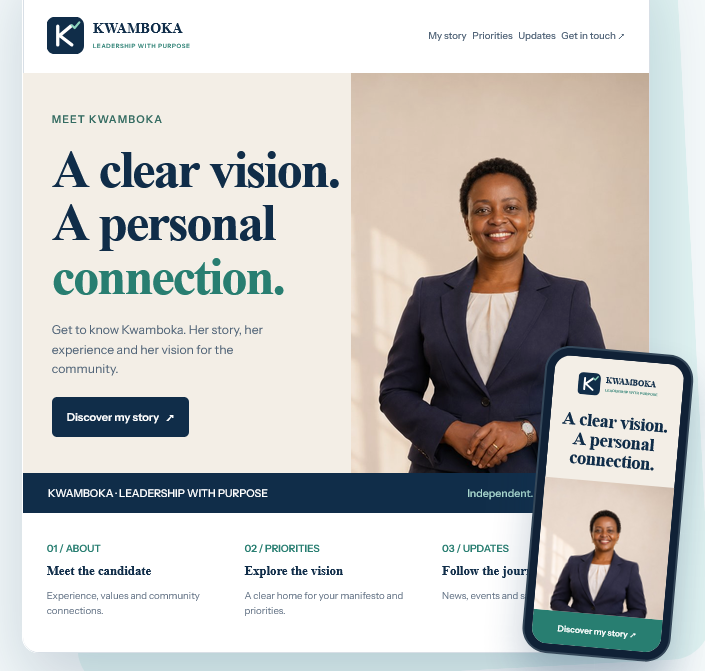
Confirm which images are approved for public use. If a design uses sample photographs or a fictional identity, label it as a concept.
6. Public Contact Details That Someone Monitors
Decide how visitors should reach your team.
You may use a public telephone number, an email address, WhatsApp or a contact form. Whichever options you choose, assign responsibility for responding.
A simple enquiry form may only need a name, contact method and message. Collect the information needed to handle the enquiry, and explain how it will be used.
Test the full process before launch. A form that displays a success message still needs to deliver the enquiry to the intended recipient.
7. News and Events Your Team Can Maintain
A news section needs someone to supply, approve and publish updates.
Agree on this responsibility early. For a small team, one designated editor may be sufficient. Larger teams may need a review process.
Event listings should include confirmed dates, times and locations. After an event has passed, move it into an archive or replace the listing with an update.
Start with sections your team can maintain consistently. You can add more as the amount of approved content grows.
8. Clear Domain Ownership and Renewal Arrangements
Before development begins, establish who will hold the domain registration and receive renewal notices.
Your team should know:
- Which domain is being registered.
- Who controls the registration account.
- What hosting and domain renewals cost.
- Who has authorised website access.
- How access will be handed over.
- What happens if you change service providers.
Keep access details with the designated administrator and agree on backup and recovery arrangements.
9. A Website Launch Checklist
Review the complete website before approving publication.
On a phone and computer, check that:
- Your name, intended position and area are correct.
- The biography and manifesto contain approved information.
- Navigation links open the right pages.
- Documents download successfully.
- Telephone, email and social links work.
- Contact enquiries reach the right person.
- Dates and event details are current.
- Images display clearly.
- The website’s shared-link title and image are appropriate.
Ask someone who has not worked on the project to try finding your biography, manifesto and contact information. Their experience can reveal unclear navigation.
10. Support After the Website Goes Live
Agree on what happens after launch.
Your team may manage content while the developer handles software updates, backups and technical issues. Alternatively, you may need an ongoing content service.
Specify what the support arrangement includes, how changes are requested and the expected response times. Clarify whether new pages, substantial redesigns or urgent uploads attract additional charges.
This keeps responsibilities clear as the website develops.
Ready to Build Your Candidate Website?
Send Top Web Design Kenya your public name, intended position and area, required pages, available content and preferred launch date.
We can help you turn that information into a practical website scope, consistent visual design and clear quotation.
Request your candidate website quote.
Call or WhatsApp: 0721 985 722
Email: mail@topwebdesign.co.ke